To build the report, data is collected from a number of different sources in eReserve Plus. Rules for the report are described below, followed by a number of diagnostic columns to assist copyright officers with quality assurance of the data.
The report can be run from eReserve Plus and a zip file will be sent to the logged-in user’s email address.
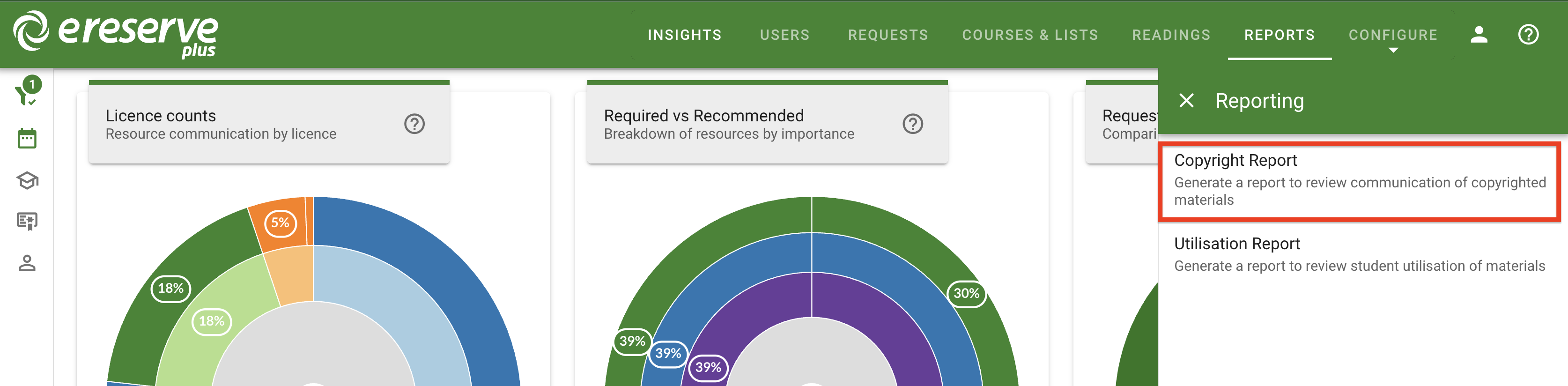
To begin, click on 'Reports' to open the Reporting Drawer, then click 'Copyright Report'.
Figure 1 : The Reports drawer
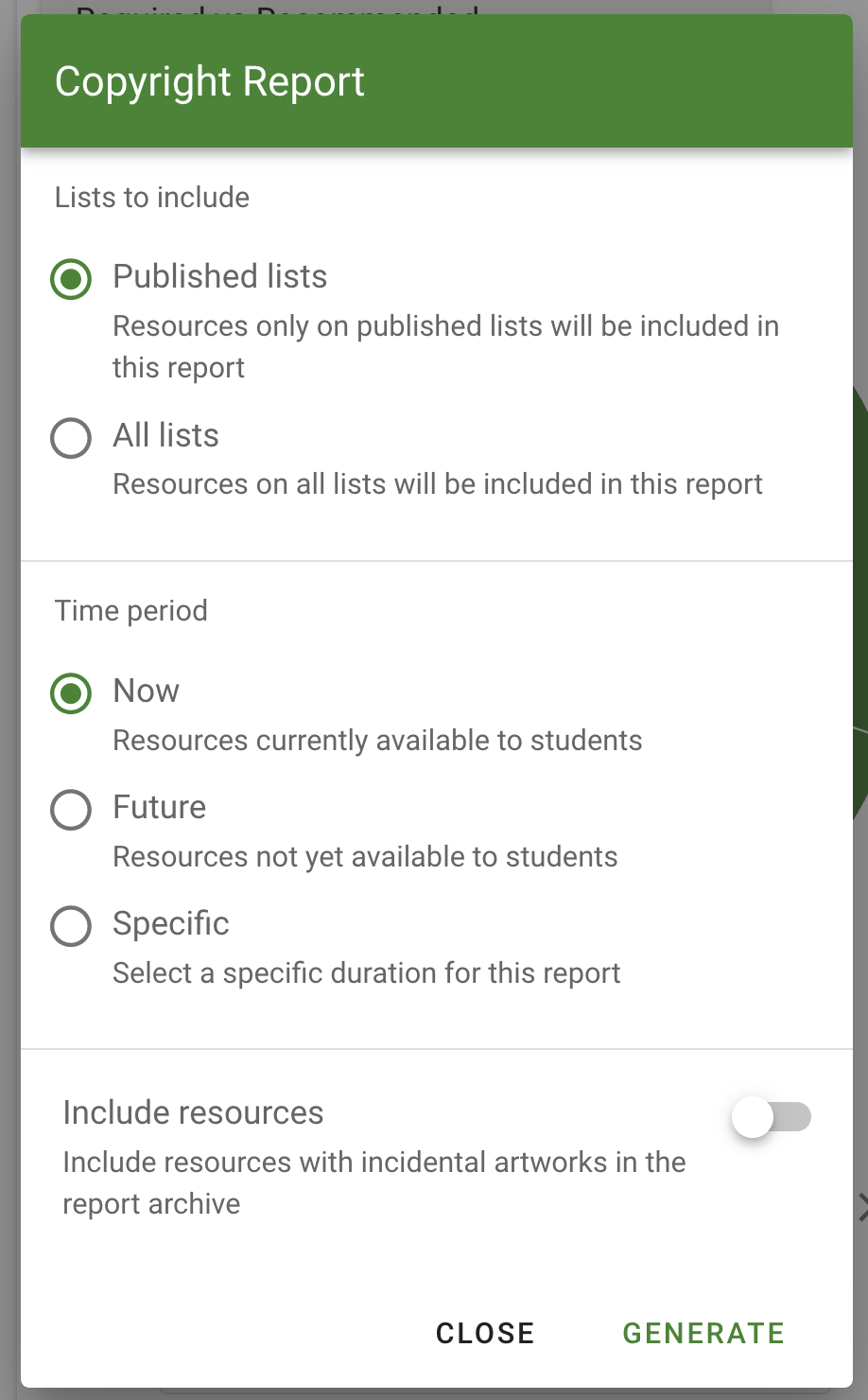
Figure 2 : The Copyright Report options
First, select if the report is to include resources only from Published lists or ALL lists (regardless of publication status).
Next, select the time period for the report:
Now - pre-selects all readings available to students now
Future - pre-selects all readings scheduled to be communicated on future Reading Lists
Specific - Select a Start and End Date to select all readings copied/communicated between the selected dates
Clicking on “Include resources” toggle to the right will send the report CSV file plus the PDF files for records which have missing metadata.
If the “Include resources” toggle is disabled, then only the report CSV file will be sent.
Clicking ‘Generate’ will begin the report generation process, which will be compiled into a zip file and sent to the logged-in user’s email address.
Rules for report
Following are the rules for each field. This is intended as a reference for Copyright Officers to understand the underlying business rules for each column in the report.
Publisher
if the schedule references a detailed reading in eReserve then
    if the reading has a Publisher Name then
        eReserve will use that Publisher Name
    otherwise
        eReserve will respond with DK (Don't Know)
Place
if the schedule references a detailed reading in eReserve then
    if the reading has a Place then
        eReserve will use that Place
    otherwise
        eReserve will respond with an empty field
Book Serial
if the schedule references a detailed reading in eReserve then
    if the reading has an ISBN/ISSN then
        eReserve will use that ISBN/ISSN
    else if the reading is a file and has a Source URL then
        eReserve will use the Source URL
otherwise
    eReserve will respond with DK (Don't Know)
Major Title
if the schedule references a detailed reading in eReserve then
    if the reading has a Publication Name then
        eReserve will use that Publication Name
    otherwise
        eReserve will respond with DK (Don't Know)
Minor Title
if the schedule references a detailed reading in eReserve then
    if the reading has a Reading Title then
        eReserve will use that Reading Title
    otherwise
        eReserve will respond with DK (Don't Know)
else if the schedule only has basic details (i.e. it's incomplete) then
    eReserve will respond with the provided title in the schedule
Volume
if the schedule references a detailed reading in eReserve then
    if a reading has a Volume then
        eReserve will use that Volume
    otherwise
        eReserve will respond with an empty field
Issue
if the schedule references a detailed reading in eReserve then
    if a reading has an Issue recorded then
        eReserve will use that Issue
    otherwise
        eReserve will respond with an empty field
Edition
if the schedule references a detailed reading in eReserve then
    if a reading has an Edition recorded then
        eReserve will use that Edition
    otherwise
        eReserve will respond with an empty field
Year
if the schedule references a detailed reading in eReserve then
    if a reading has a Year recorded then
        eReserve will use that Year
    otherwise
        eReserve will respond with an empty field
Author(s) / Creator(s) of Work
if the schedule references a detailed reading in eReserve then
    if the reading has Authors recorded then
        eReserve will use those Authors
    otherwise
        eReserve will respond with DK (Don't Know)
Pagination
if the schedule references a detailed reading in eReserve then
    if the Count Type is Paginated then
        eReserve will provide the recorded page numbers
    otherwise
        eReserve will respond with an empty field
Pages
if the schedule references a detailed reading in eReserve then
    if the Count Type is Paginated then
        eReserve will calculate the number of pages utilised
    otherwise
        eReserve will respond with an emtpy field
Source Document Total Pages
if the schedule references a Source Document in eReserve then
    if the Count Type is Paginated then
        eReserve will provide the recorded total page numbers
    otherwise
        eReserve will respond with an empty field
Count Type
if the schedule references a detailed reading in eReserve then
    eReserve will provide the type of count recorded for the reading
    (i.e. G (Graphic Only), W (Not Paginated) or P (Paginated))
else
    eReserve will respond with an empty field
Copies
Manually updated by Copyright Officers with Enrolled Student Count from the Student Management System
Major Material Type
eReserve will respond with the selected Source Document genre
Minor Material Type
eReserve will respond with the selected Reading genre
School Code
eReserve will respond with the School name for the Course that the reading is being made available for
Course Code
eReserve will respond with the Course Code that the reading is being made availble for
Start of Communication
if the reading is available during the sampling period and
it has been made available online or sent via email then
    eReserve will respond with the Start Date of the
    availability of the reading
otherwise
    eReserve will respond with an empty field
End of Communication
if the reading is available during the sampling period and
it has been made available online or sent via email then
    if the reading has been sent by email then
        eReserve will respond with 'Email'
    else if the reading has an the End Date and that date
    falls in the sampling period then
        eReserve will respond with End Date of the
        availability of the reading
otherwise
    eReserve will respond with an empty field
Diagnostics
The following fields may be useful to Copyright Officers when requesting eReserve support or providing additional analytics to the Management Team
Teaching Session
The name of the predefined Teaching Session assigned to the reading list.
If the reading list is using a custom duration, the field will instead display “DK”.
Scheduling ID
Identifier which can be used for reference when requesting eReserve support on the Request Schedule
Reading ID
Identifier which can be used for reference when requesting eReserve support on the Reading in the repository
Reading List ID
Identifier which can be used for reference when requesting eReserve support on the Reading List information
Reading List Item ID
Identifier which can be used for reference when requesting eReserve support on the Reading List item
Reading List Creation
Date that the Reading List was created
Reading List Last Updated
Date that the Reading List was last updated
Reading List Name
The name of the Reading List on which the Reading was communicated / copied
Student Count
The unique number of students who accessed the Reading between the ‘Start of Communication’ and ‘End of Communication’ dates. Unique can only be calculated by the
authentication method of the Learning Management System. If the same Student accesses from two different Learning Management Systems then the report will recognise the
count as ‘2’.
Student Access
The total number of accesses by students between the Reading ‘Start of Communication’ and ‘End of Communication’ dates. Each time a student downloads or views a reading
on a Reading List.
Schedule Updated At
The last updated date for the scheduled communication record
Request Updated At
The last updated date for the request record associated with the scheduled communication record
Section end pages from source publication
The total page count for the source document of file-based resources. If this field has been populated, it will display the end pages as entered within the field.
Otherwise, if there is no data present, the field will be blank.
Total page count for Source publication
If the ‘Section end pages from source publication’ field is populated, this will display the TOTAL combined value of the end pages provided.
If no data is present in the affiliated field, this column field will be blank.